Amazon CPC (cost per click) is what you pay each time a shopper clicks your ad. You set a bid, the auction sets the final CPC, and it usually lands below your bid. Your bidding strategy, placement adjustments and audience adjustments can push it higher, so every bid needs a ceiling set by your margin.
Clicks on Amazon cost more every year. Across 77 accounts that advertised every month, the pooled Amazon advertising CPC rose from $1.11 to $1.36 between August 2025 and August 2026, while ACoS climbed from 21.3% to 27.6% (SellerStack benchmarks). Sellers who treat CPC as a number to push down miss the point. CPC is the result of choices you make: the bid, the bidding strategy and the adjustments on top of it.
I manage a portfolio of brands with $5.1M+ in annual revenue at an average TACoS of about 13.5%, and every bid in it traces back to unit economics. This guide explains how Amazon sets your CPC, how the bidding levers change it, and two ways to judge it for profitable growth. If you are new to ads, start with what Amazon PPC is and the two goals it serves. For the full method, read my Amazon PPC management playbook.
Table of Contents
What Is Amazon CPC?
Amazon CPC is the price of one click on your ad. Sponsored Products and Sponsored Brands charge per click. Sponsored Display and Amazon DSP can also charge per 1,000 viewable impressions instead.
The formula is simple:
Average CPC = Ad spend ÷ Clicks
A campaign that spent $600 on 500 clicks has an average CPC of $1.20. That number is an average across many auctions. Some clicks cost $0.70 and some cost $2.10.
Amazon separates two figures. Average CPC is what you actually paid. Maximum CPC is the most you could be charged for one click. Amazon defines it as “their base bid plus any adjustments from settings such as dynamic bidding or cost controls” (Amazon Ads CPC guide). Your report shows the average. Your settings decide the maximum.
Amazon CPC vs Bid: Why You Rarely Pay Your Max
Your bid is the most you are willing to pay for a click before adjustments. Your CPC is what the auction charges. They are different numbers, and the gap between them is where most sellers lose track of cost.
Amazon says the final CPC “is usually determined by an auction and is based on your adjusted bid plus additional factors” (Amazon Ads). Those factors include relevance and how likely your ad is to be clicked and convert. A relevant listing with a strong conversion rate can win a placement against a higher bid and pay less for it.
Here is how it plays out. You bid $1.50 on “insulated water bottle 32 oz”. The competing ads and their relevance mean you win the click for $1.08. You paid $1.08, not $1.50. Next week a competitor raises its bid, and the same click costs $1.41. Your bid did not change. Your CPC did.
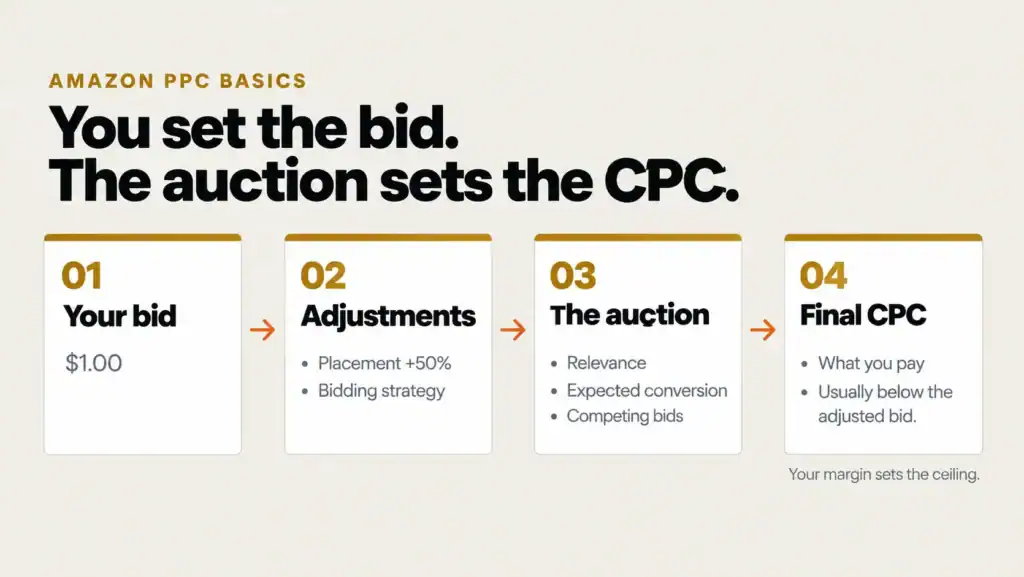
The takeaway: you control the bid. The auction controls the CPC. You set the bid. The auction sets the CPC. Your margin sets the ceiling.
Amazon Bidding Strategies
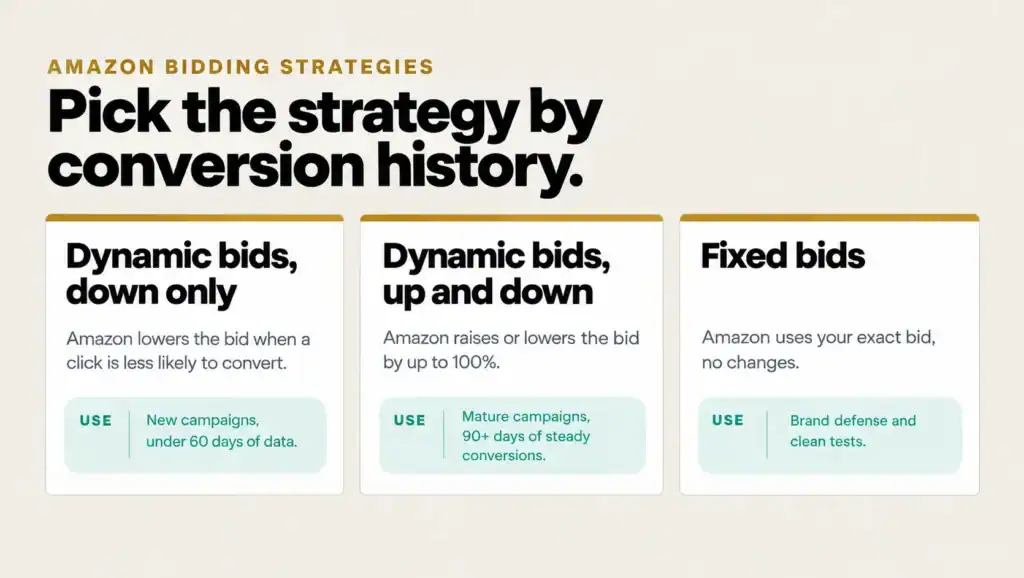
Your bidding strategy decides how far Amazon may move your bid in each auction. Sponsored Products offers three, and the right one depends on how much conversion history a campaign has. This is the core of any Amazon PPC bidding strategy.
Dynamic Bids, Down Only
Amazon lowers your bid in real time when a click is less likely to convert. It never raises the bid above what you set. I use it for every new campaign and any campaign with less than 60 days of conversion history, because it protects budget while the data builds.
Dynamic Bids, Up and Down
Amazon raises your bid when a click is more likely to convert and lowers it when it is less likely. Amazon states it “will increase or decrease your bids by up to 100% for all placements based on performance” (Amazon Ads dynamic bidding guide). A $1.00 bid can become a $2.00 click. I only switch to it on mature campaigns with 90+ days of steady conversion data.
Fixed Bids
Amazon uses your exact bid and makes no changes. I use fixed bids for brand defense and for clean tests, where I want to know that a result came from my change and not from the algorithm.
Rule-based bidding
Amazon also offers rule-based bidding on eligible Sponsored Products campaigns. You set a ROAS guardrail, and Amazon adjusts bids to hold it. It is only available once a campaign has enough history, so it is a later-stage option.
Bid Adjustments That Raise Your CPC
Bid adjustments multiply your bid for specific placements or shoppers. The bidding strategy then works on that adjusted bid. Every adjustment raises your maximum CPC, so each one needs a reason.
Placement multipliers
Sponsored Products shows ads in three placements: top of search, rest of search and product pages. You can raise the bid for any of them, and Amazon says “you can add placement bid adjustments up to 900%” (Amazon Ads best practices). Open the Placement report first. If top of search converts at 12% and rest of search at 6%, a 50% to 100% top of search adjustment makes sense. Wait for at least 30 days of placement data before you set one.
Amazon Business placement
Amazon Business shoppers buy for companies, often in bulk. Amazon lets you “increase bids for business shoppers on existing B2C campaigns” (Amazon Ads B2B guide), and Amazon Business reached $60B in annualized gross sales in 2025. Office supplies, cleaning, packaging and industrial SKUs are natural fits. Check the Amazon Business Placements tab under Bid adjustments before raising it.
Audience bid adjustments
Audience adjustments raise bids for specific shoppers, such as people who viewed your product or have never bought from your brand. Amazon added audience bid boosts for Sponsored Products and Sponsored Brands through Amazon Marketing Cloud audiences in October 2024. For new-to-brand shoppers on Sponsored Brands, Amazon reports that advertisers who raised bids by 100% or more “saw 2x more NTB orders” (Amazon Ads).
How the levers stack: one $1.00 bid, four outcomes
| Setup | Placement adjustment | Strategy | Highest possible CPC |
|---|---|---|---|
| A | None | Fixed | $1.00 |
| B | +50% top of search | Fixed | $1.50 |
| C | +50% top of search | Down only | $1.50 (Amazon can only lower it) |
| D | +50% top of search | Up and down | $3.00 ($1.50 × up to 2) |
Setup D is why a seller who “bids $1.00” can see $2.50 clicks in the Placement report. The bid was never the ceiling. The settings were.
See bid discipline in practice. In the bags brand turnaround case study, monthly sales went from $22K → $71K (+220%) on Amazon US between Dec 2021 and Aug 2022. If your CPCs keep rising and you are not sure which setting is driving them, happy to walk through your account on a short call.
Amazon Cost per Click in 2026
The average Amazon cost per click sits a little above $1.20 in 2026, but category and placement move it more than anything else. Ad Badger’s app data puts the platform average at $1.22 for January to August 2026, up $0.10 year on year (Ad Badger).
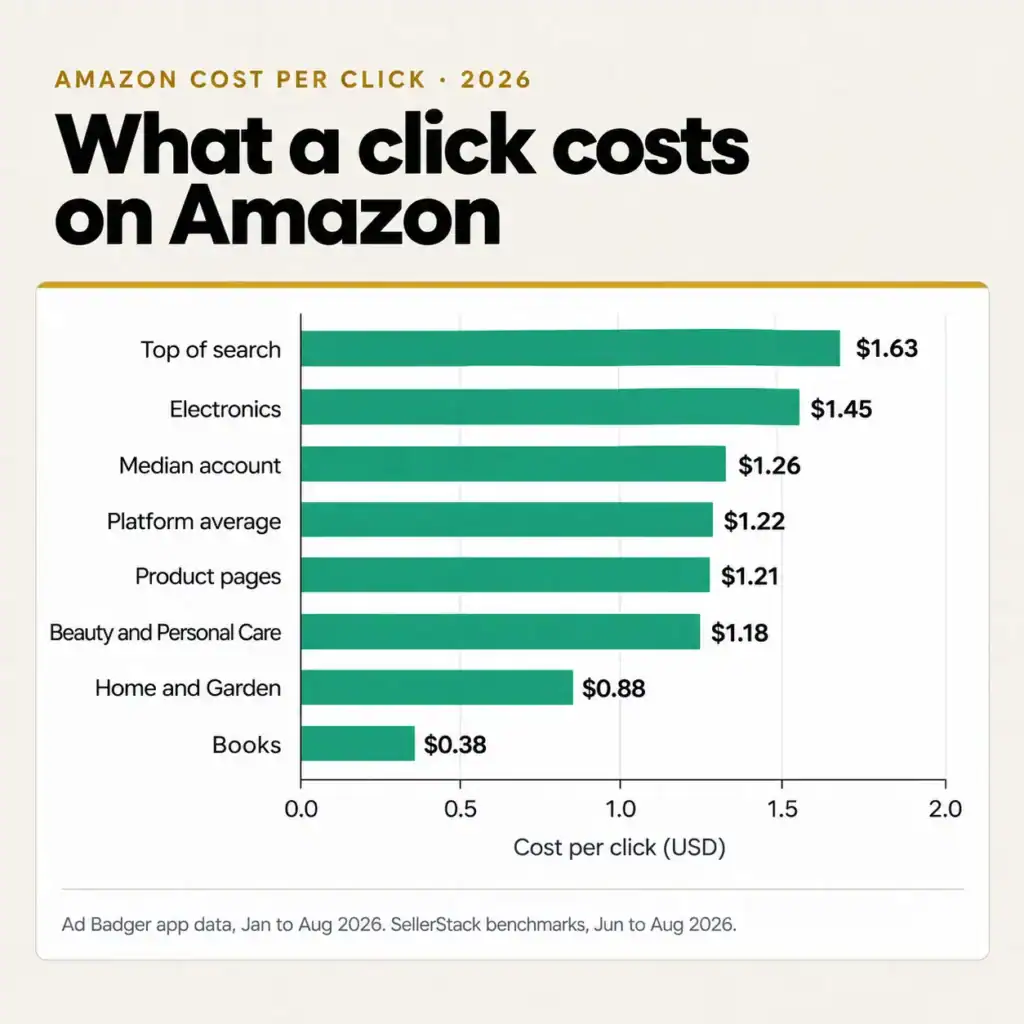
CPCs rise for reasons outside your account. More sellers bid on the same terms, top of search has few slots, and Prime Day and Q4 pull in extra demand. A benchmark tells you where the market is. It does not tell you what you can afford. Only your margin does.
Two Ways to Manage Amazon CPC for Profitable Growth
There are two ways to look at CPC when the goal is profitable growth. The first sets each bid. The second tells you whether the ads, as a whole, are paying for themselves.
Max CPC: optimize every bid for margin
Max CPC is the highest CPC a keyword can carry and still hit its target ACoS. It is the same formula I use in the Amazon PPC management playbook:
Max CPC = Target ACoS × Conversion rate × Average selling price
A $30 product with a 12% conversion rate and a 30% target ACoS gives 30% × 12% × $30 = $1.08. Bid above $1.08 on that keyword and every sale costs more than the margin allows. This is the keyword-level lever for Amazon CPC optimization, and it also shows the link in Amazon CPC vs ACoS: ACoS = CPC ÷ (conversion rate × price). Lower the CPC or raise the conversion rate, and ACoS falls.
Ad cost per order: the bird’s-eye view
The second view asks how much you are willing to spend in ads to win one sale:
Ad cost per order = (Clicks ÷ Orders) × CPC
If a campaign needs 10 clicks per order at a $1.20 CPC, each sale costs $12.00 in ads. Compare that with your profit per unit before ads. If the $30 product leaves $11.00 after COGs, fees and shipping, every ad-driven sale loses $1.00. At 7 clicks per order, the same $1.20 CPC costs $8.40 per sale and earns $2.60.
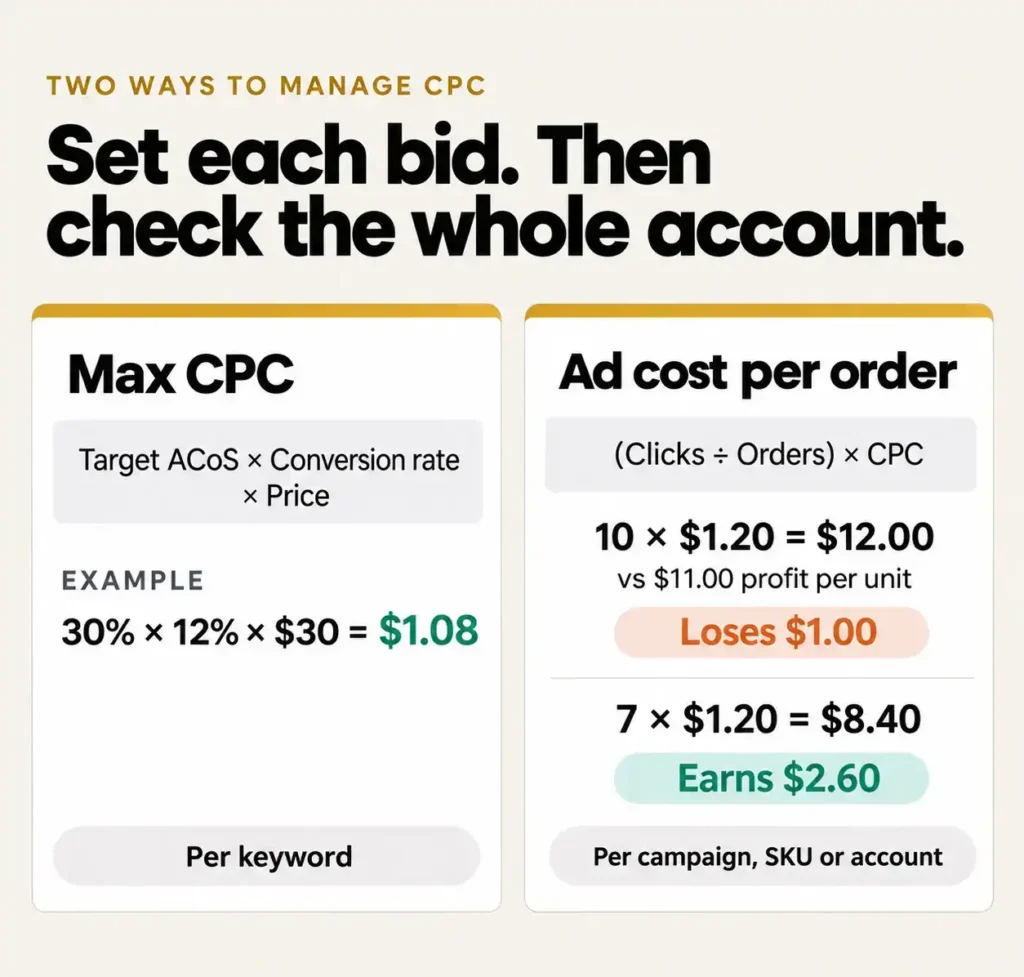
This view works at any level: a campaign, a SKU or the whole account. It shows at a glance how profitable the ads are, before you open a single keyword.
Should You Adjust Amazon Bids or Multipliers Every Day?
Daily bid changes feel like control. In practice they are a double-edged sword, and on dynamic bidding they often backfire.
Periodic changes based on how the data changes
Every source I checked agrees that bids should change on a schedule set by the data, not by the day. Amazon says to review bids “about once every two weeks” and to “limit your changes while testing strategies” (Amazon Ads). SellerLabs suggests every 7 to 14 days in small 5% to 15% steps, and calls “Optimizing Too Frequently” the first mistake sellers make.
My Amazon Guy sets no fixed schedule: high-traffic keywords can be reviewed every 3 to 7 days, while low-traffic keywords need 30 to 60 days of data. SellerSprite advises at least 7 to 14 days of data before switching strategy. None of them recommends daily changes. Their shared range for Amazon PPC bid optimization is every 3 to 14 days, depending on how much traffic a keyword gets.
A recipe for destruction: daily changes keep dynamic bidding from settling
The sources warn against reacting to noise. The bigger problem is mechanical. Under down only or up and down, Amazon’s algorithm moves your bid between levels and placements to find where it gets the most clicks that convert. That search takes time. Every manual change to the bid or a placement multiplier restarts it. The algorithm never settles into a working range, impressions and clicks shrink, and the campaign eventually dies.
The two screenshots below come from one Sponsored Products campaign in an example account I have access to. Its change history logged 645 changes year to date in 2026, more than two a day on average. Between 15 and 18 Oct 2026, the top of search adjustment went 102% → 62% → 77% → 90% → 70%, rest of search moved four times, and the product page and Amazon Business adjustments were cut to 0%.
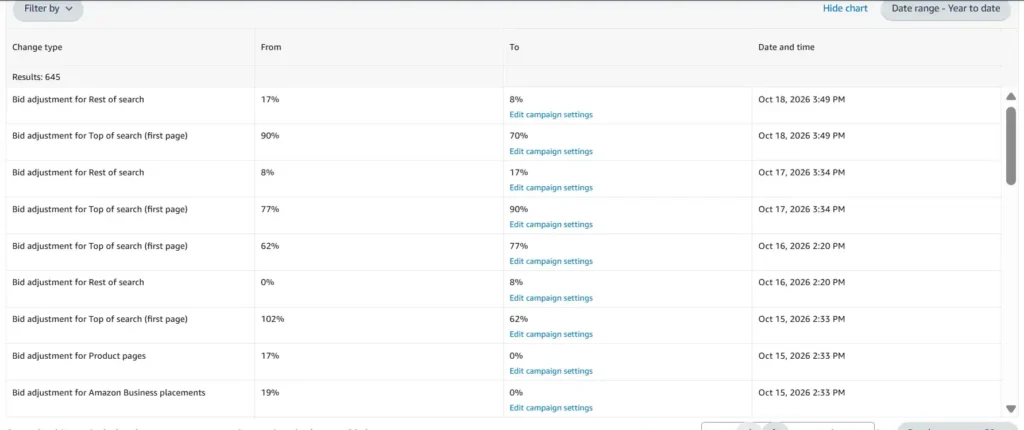
Amazon Ads campaign history shows 645 bid adjustment changes in 2026 year to date, with the top of search placement adjustment changed daily from 102% to 62%, 77%, 90% and 70% between 15 and 18 October 2026
Over 2026, monthly impressions peaked at about 240K in May, fell to about 113K in July and dropped under 10K by September. Monthly sales followed, from about $20K in May to about $1.6K in September.
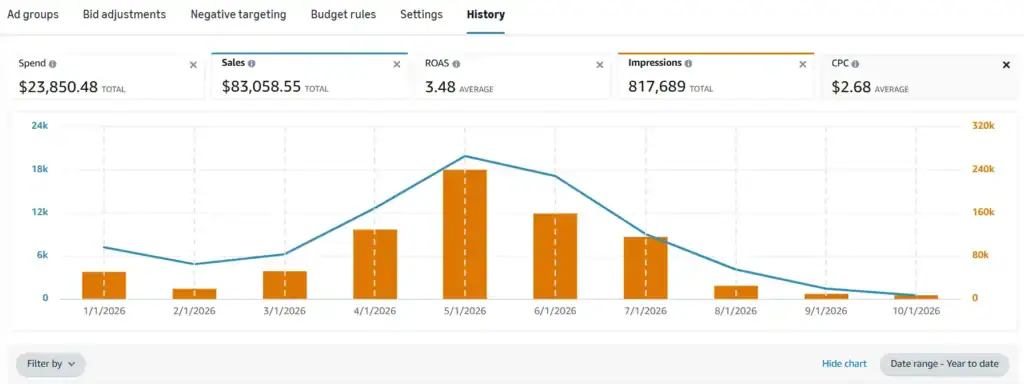
Amazon CPC campaign chart for 2026 year to date: $23,850.48 spend, $83,058.55 sales, 3.48 ROAS, $2.68 average CPC, with monthly impressions and sales falling sharply from May to October
My rule: change one lever at a time, review on a fixed window sized to the keyword’s traffic, and give the algorithm room to settle. Fixed-bid campaigns, stock-outs and deal days are the exceptions where faster changes make sense.
FAQs
Why did my CPC go up when I did not change my bids?
The auction changed around you. A competitor raised bids, a dynamic up and down strategy pushed more clicks to top of search, or your relevance dropped after a price change or a lost Featured Offer. Check the Placement report and search term report for the same dates.
What is the minimum bid on Amazon?
In the US, Sponsored Products keyword bids start at $0.02. Very low bids rarely win placements on competitive terms, so the minimum is a floor, not a strategy.
Does a higher bid improve organic ranking?
Not directly. Organic rank follows sales velocity, click-through rate and conversion rate on a keyword. A higher bid can win more clicks and sales, which can lift rank, but only if the listing converts. I explain the link in what Amazon PPC is.
Does Amazon charge for accidental or invalid clicks?
Amazon Ads filters invalid traffic, such as bot and repeated clicks, and shows what it removed in the Gross and invalid traffic report. The clicks you are billed for are the ones left after filtering.
How I Set Bids for Six- and Seven-Figure Brands
Every account I take on starts with the same three numbers: break-even ACoS per SKU, max CPC per keyword, and ad cost per order per campaign. Bidding strategies and adjustments come after, and changes run on a fixed review window, not on a bad day. That is how the portfolio I manage holds an average TACoS of about 13.5% on $5.1M+ in annual revenue.
Good Amazon advertising bid management needs someone who sees the margin, not only the dashboard. If you are deciding who should own it, read my comparison of an Amazon PPC agency vs an in-house expert. For the full system, see the Amazon PPC management playbook.
If your CPCs are climbing and you are not sure which setting is behind it, happy to walk through your account on a short call. Calls run until 2 pm EST.